In the vm0-ai/vm0-skills repository, we have developed dozens of skills for integrating with various third-party SaaS platforms. These skills enable Claude Code and Codex agents to interact seamlessly with services like GitHub, Slack, Discord, and many others.
While these integrations are incredibly valuable, they present a significant testing challenge. Without proper testing infrastructure, we cannot reliably verify whether skills function as expected or detect breaking changes when third-party APIs evolve.
Why testing third-party AI agent skills is hard
Testing third-party integrations is inherently difficult. Each skill depends on external APIs that may change without notice, requiring constant vigilance to maintain reliability. Traditional unit tests often fall short because they can't replicate real-world API behavior, authentication flows, and edge cases that only emerge in production environments.
Without comprehensive testing, several critical issues remain unaddressed:
- Functionality verification: We cannot confirm that skills work as intended in actual usage scenarios
- Breaking change detection: When third-party SaaS APIs evolve, we have no automated way to identify compatibility issues
- Authentication validation: OAuth flows, token refresh mechanisms, and permission scopes need continuous verification
- Error handling: We must ensure graceful degradation when external services are unavailable
This creates a significant maintenance burden and potential reliability issues that could impact production workflows.
Using AI agents to test AI agent skills in real environments
Since these skills are specifically designed for Claude Code and Codex agents, the most natural and effective approach is to use these same agents to test them. This creates a self-validating ecosystem where the tools test themselves in their intended environment.
VM0 provides the cloud infrastructure necessary to run Claude Code and Codex agents reliably, making it an ideal platform for implementing this testing strategy.
An end-to-end automated workflow for testing AI agent skills
The complete workflow for automated skill testing is described below. This agent systematically tests every skill in the repository, generates comprehensive reports, and notifies the team through multiple channels.
# Skills Tester Agent

## Overview

This agent performs automated testing of all skills in the vm0-skills repository.

## Critical Requirements

**MANDATORY: Complete All Tests Without Exception**

- No matter how long the task takes, it MUST be completed in full
- Continue until ALL items in `TODO.md` are tested - no early termination
- **NO skipping tasks** - every skill must be tested
- **NO selective testing** - do not cherry-pick which skills to test
- **Every example MUST have a result** - each example command in every skill's SKILL.md must be executed and recorded
- If a test fails, record the failure and continue to the next test
- Do not stop or pause until the entire test suite is complete

## Instructions

1. **Clone and Initialize**
   - Clone the repo `vm0-ai/vm0-skills`
   - Create a `TODO.md` file to track testing progress

2. **Generate Todo List**
   - For each skill folder in the repo, add a todo item to `TODO.md`

3. **Test Each Skill**
   - Create a sub-agent for each skill to test
   - Each sub-agent should:
     - Verify all required environment variables exist
     - Test each example command in the skill's SKILL.md
     - Write a temporary test result markdown file
     - Record whether the test passed, and specifically note any shell command failures or jq parsing errors

4. **Summarize Results**
   - Aggregate all test results into `result.md`

5. **Update README**
   - Based on `result.md`, update the `README.md`
   - Update or insert a skill list section with:
     - Brief description of each skill's capabilities
     - Test status (passed/failed)

6. **Commit and Push**
   - Only commit `README.md`
   - Push to the repository using `GITHUB_TOKEN` for authentication

7. **Report Issues**
   - For skills with test failures, create a GitHub issue summarizing all problems

8. **Notify Slack**
   - Post a message to Slack channel `#dev` with:
     - Total number of skills
     - Number of passed tests
     - Number of failed tests
     - Brief summary of issues
     - Link to the GitHub issue (if created)

9. **Notify Discord**
   - Post a message to the Discord `skills` channel with:
     - Confirmation that routine testing is complete
     - Number of skills that passed
     - Total number of skills tested
Configuring the agent with vm0.yaml
Next, you just need to schedule VM0 to run this workflow. Create a vm0.yaml file to describe the agent container configuration. This file specifies which skills the agent needs, what environment variables to inject, and how to run the testing workflow.
version: "1.0"

agents:
  skills-tester:
    image: skills-tester:latest
    provider: claude-code
    instructions: AGENTS.md
    skills:
      - https://github.com/vm0-ai/vm0-skills/tree/main/github
      - https://github.com/vm0-ai/vm0-skills/tree/main/slack
      - https://github.com/vm0-ai/vm0-skills/tree/main/discord
    environment:
      CLAUDE_CODE_OAUTH_TOKEN: ${{ secrets.CLAUDE_CODE_OAUTH_TOKEN }}
      GITHUB_TOKEN: ${{ secrets.GITHUB_TOKEN }}
      SLACK_BOT_TOKEN: ${{ secrets.SLACK_BOT_TOKEN }}
      DISCORD_BOT_TOKEN: ${{ secrets.DISCORD_BOT_TOKEN }}
      # ... additional environment variables as needed
For the complete configuration file, refer to vm0-skills/.vm0/vm0.yaml. Some environment variables are omitted in this example for brevity.
This agent configuration includes three essential skills:
- GitHub skill: For repository operations, issue creation, and README updates
- Slack skill: For posting test results to team channels
- Discord skill: For community notifications about test completion
Creating the Docker image
You'll also need to configure a Docker image that installs the necessary dependencies, particularly the GitHub CLI (gh) that the agent uses for repository operations.
Create a Dockerfile:
FROM node:20-slim

RUN apt-get update && apt-get install -y \\
    git \\
    curl \\
    python3 \\
    python3-pip \\
    python3-venv \\
    jq \\
    && rm -rf /var/lib/apt/lists/*

RUN curl -fsSL <https://cli.github.com/packages/githubcli-archive-keyring.gpg> | dd of=/usr/share/keyrings/githubcli-archive-keyring.gpg \\
    && chmod go+r /usr/share/keyrings/githubcli-archive-keyring.gpg \\
    && echo "deb [arch=$(dpkg --print-architecture) signed-by=/usr/share/keyrings/githubcli-archive-keyring.gpg] <https://cli.github.com/packages> stable main" | tee /etc/apt/sources.list.d/github-cli.list > /dev/null \\
    && apt-get update \\
    && apt-get install -y gh \\
    && rm -rf /var/lib/apt/lists/*

RUN npm install -g @anthropic-ai/claude-code
This Dockerfile creates a lightweight container with:
- Node.js 20: Runtime environment for Claude Code
- Git: Version control operations
- GitHub CLI: Streamlined GitHub API interactions
- Python 3: For running skill test scripts
- jq: JSON parsing in shell commands
Putting the AI skill testing system together
That's all you need! With these three files in place: AGENTS.md, Dockerfile, and vm0.yaml, you have a complete automated testing system. You can see the full implementation at vm0-skills/.vm0.
Execute the following commands in your project directory to build and deploy the agent:
$ vm0 image build -f Dockerfile --name skills-tester
$ vm0 compose vm0.yaml
The first command builds the Docker image with all necessary dependencies. The second command registers the agent configuration with VM0's platform.
Running the workflow
Now you can run the entire testing workflow with a single command:
$ vm0 run skills-tester "do the job"
The agent will autonomously:
- Clone the vm0-skills repository
- Generate a testing checklist for all skills
- Execute tests for each skill systematically
- Compile comprehensive results
- Update the repository README
- Create GitHub issues for failures
- Send notifications to Slack and Discord
Debugging step-by-step
If you want to debug the workflow incrementally or test a single skill first, you can use targeted prompts:
$ vm0 run skills-tester "Only do the first step, using a single skill."
After the agent completes the first step, you can continue the session based on the session ID provided in the output:
$ vm0 run continue SESSION_ID "Do the next step."
This interactive approach allows you to:
- Verify each step before proceeding
- Inspect intermediate results
- Adjust the workflow if needed
- Debug issues more effectively
Results and notifications
After the workflow completes, you'll receive notifications across multiple channels confirming the testing results.
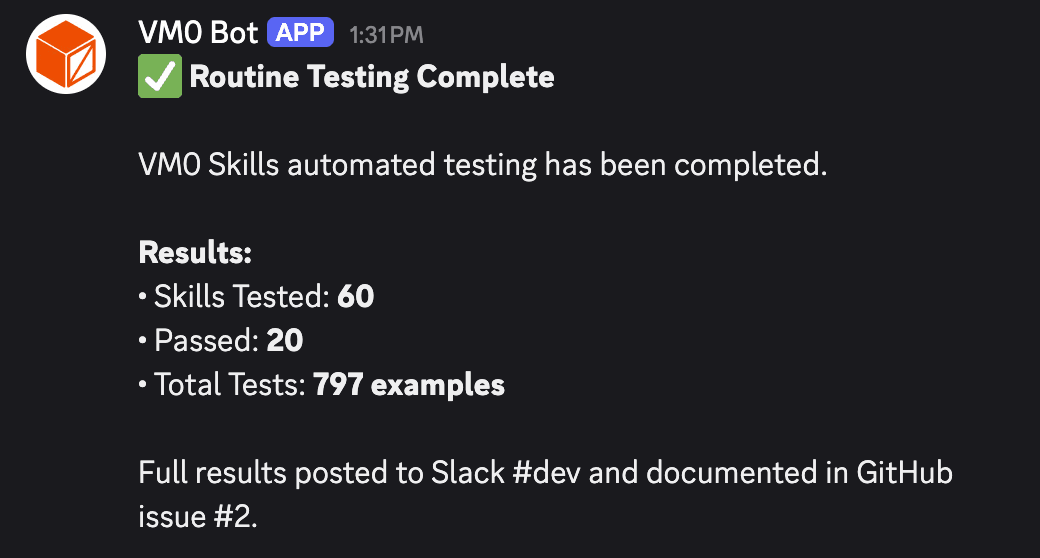 Discord community notification showing test completion summary
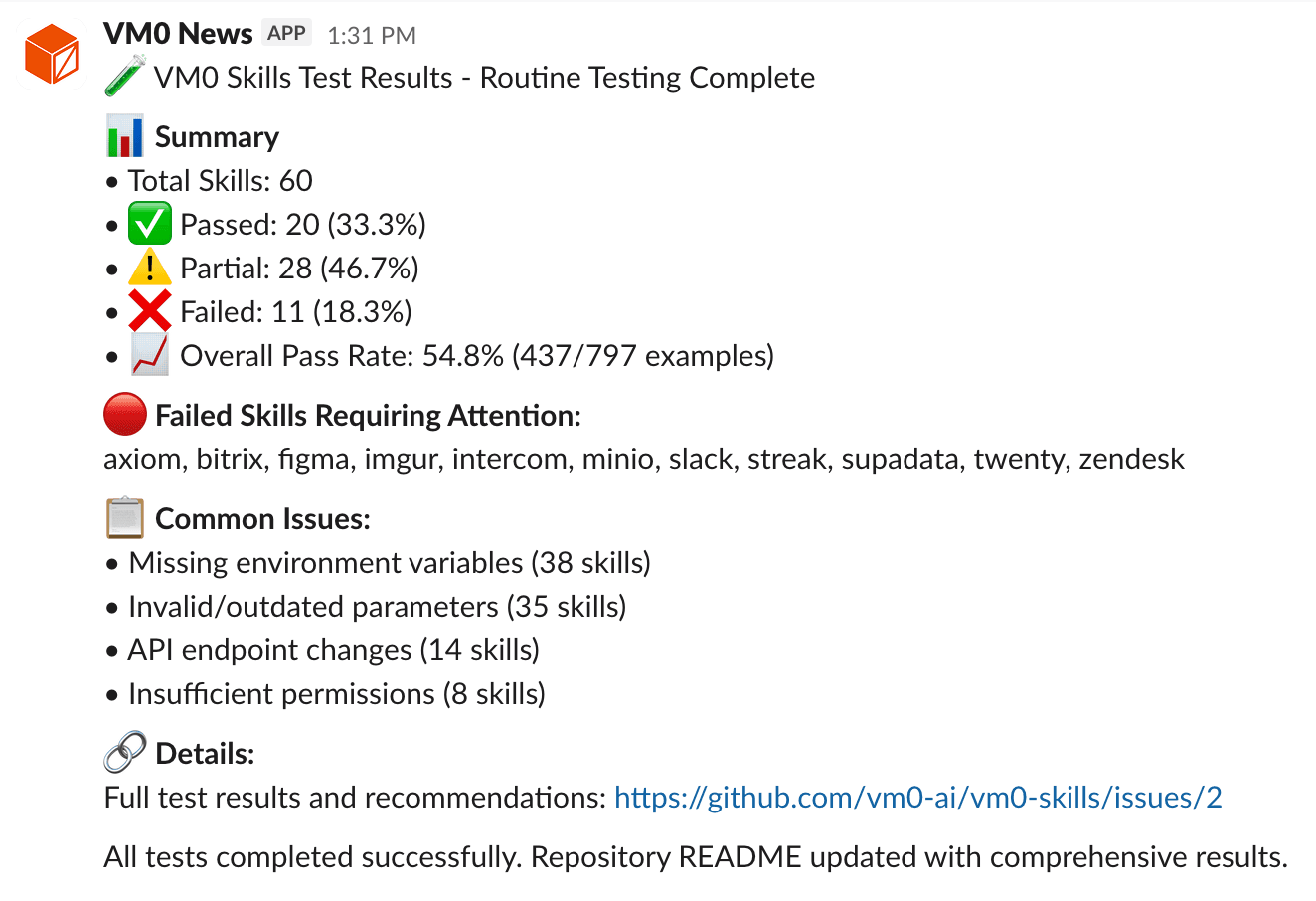 Slack team notification with detailed test results
For any skills that fail testing, the agent automatically creates a GitHub issue with comprehensive failure details. See Skill Test Failures - Issue #2 for an example of the generated issue format.
Key lessons from automating AI agent skill testing
Implementing automated skill testing with VM0 agents provides several critical benefits:
- Continuous validation: Catch breaking changes from third-party APIs immediately, before they impact production
- Realistic testing environment: Agents test skills in the exact context where they're used, eliminating the gap between test and production
- Zero manual effort: Once configured, the testing workflow runs automatically on a schedule, requiring no human intervention
- Comprehensive coverage: Every skill gets tested systematically, ensuring nothing slips through the cracks
- Team awareness: Multi-channel notifications keep everyone informed of test results and issues
By leveraging VM0's cloud infrastructure and Claude's agent capabilities, you can maintain reliable integrations with external services while minimizing the ongoing maintenance burden. This approach transforms skill testing from a manual, error-prone process into a fully automated quality assurance system.
Get started with VM0 today
Ready to automate your own workflows with AI agents? VM0 makes it easy to deploy production-ready agents in minutes, not weeks.
What you can build with VM0
-
Automated testing pipelines
Run scheduled test jobs like this skill tester to catch breaking changes in third-party APIs early.
-
Content generation workflows
Turn research, notes, or raw inputs into blog posts, docs, or release notes without manual copy-paste.
-
Data processing agents
Pull data from multiple sources, clean it up, and move it downstream, while handling failures and retries explicitly.
-
Customer support automation
Triage incoming requests, draft replies, and hand off edge cases to humans when needed.
-
Code review and analysis
Review pull requests, flag potential issues, and enforce basic rules before a human looks at the code.
Visit vm0.ai to create your free account and deploy your first agent today. Join our Discord community to connect with other builders, share your workflows, and get help from the team.
Start building the future of automated workflows.